Thursday, March 27, 2014

Customise Windows 8.1 Power Buttons and Shutdown Shortcut Settings

This method allows you to customized what your keyboard power buttons can do like power key and sleep key on your keyboard. Also using this method you can customized what will be displayed on your computer's turn-off menu like shutdown, hibernate, sleep and lock.

Follow these steps to customized this settings:

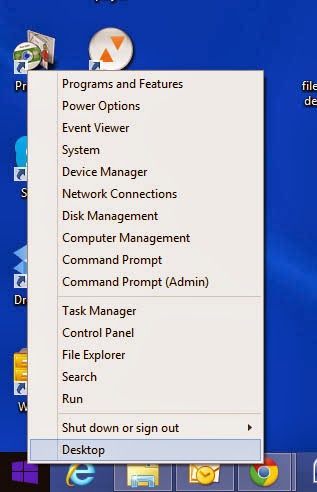
1. Right click on your Windows Logo that can be found on the left side bottom of your desktop screen.
Customize Windows 8.1 Power Buttons and Shutdown Shortcut Settings


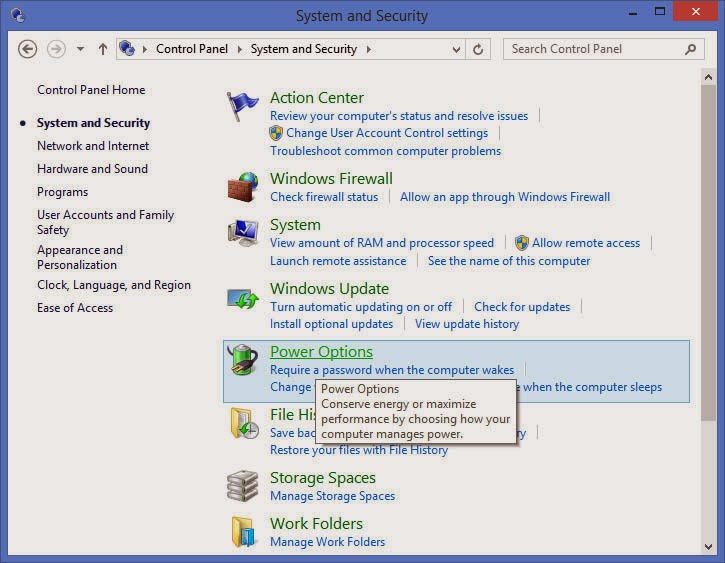
2. Select Control Panel. Then select System and Security.

Customize Windows 8.1 Power Buttons and Shutdown Shortcut Settings
3. Click Power Options.
Customize Windows 8.1 Power Buttons and Shutdown Shortcut Settings

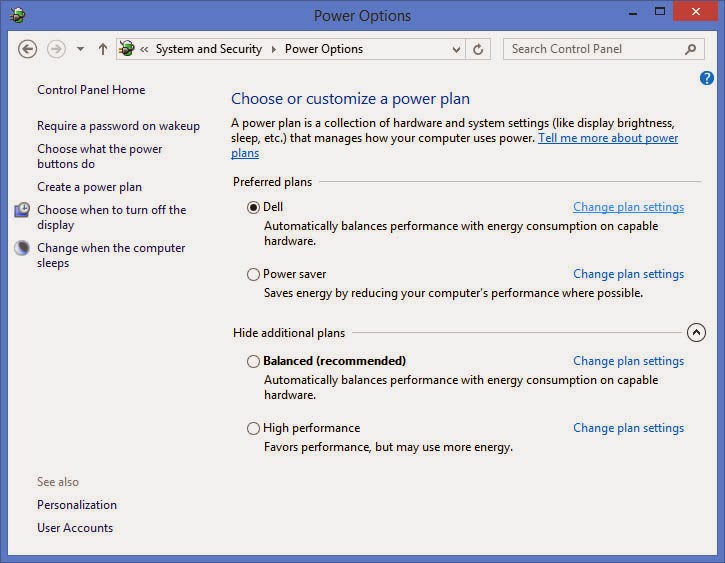
4. Then select Choose what the power buttons can do, this option can be found at the left side menu of the power options window.
Customize Windows 8.1 Power Buttons and Shutdown Shortcut Settings

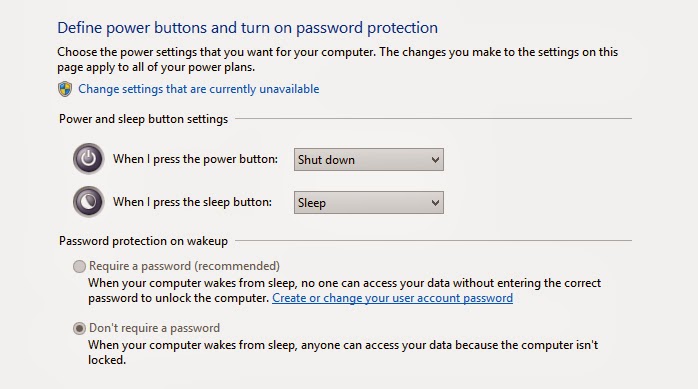
5. The click the link for Change settings that are currently unavailable to view more settings.
Customize Windows 8.1 Power Buttons and Shutdown Shortcut Settings
Power and Sleep Button Settings. This will allows you to customized what you want your keyboard keys will do when you press the corresponding key on your keyboard.


Password protection wakeup. You set set some security password here. Where when your computer wakeup from sleep mode it will require you to enter a password.

Shutdown Settings. This options will allows your top customized what options you can see on the shutdown button settings. Unchecked options will not show on the shutdown menu.
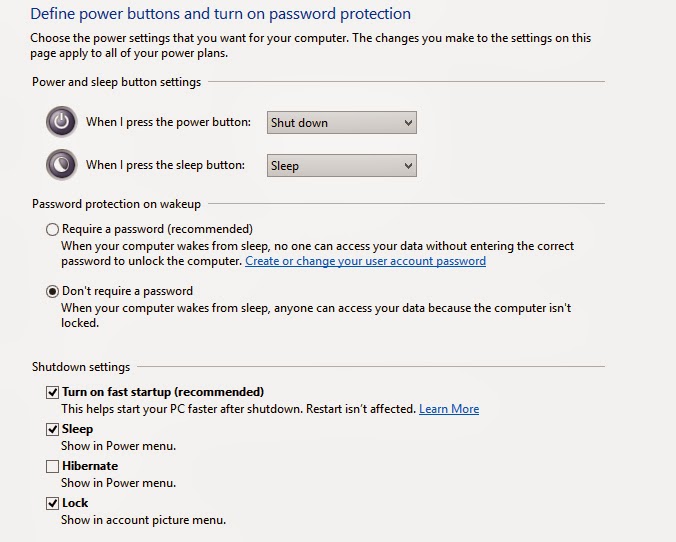
Customize Windows 8.1 Power Buttons and Shutdown Shortcut Settings


SKK Mobile will Open New Stores

SKK Mobile, one of the local brand of mobile phones in the country will open its new stores in some areas in NCR, Central Luzon and North Luzon this month. SKK Mobile aims that Filipinos will more accessible in buying their mobile phones and gadgets wherever in the country.

Here are the Schedules of SKK Mobile Grand Opening:
  1. March 28 - Sta. Lucia East Grand Mall
  2. March 29 - Metrotown Tarlac
  3. March 29 - City Walk Tarlac
  4. March 29 - Palm Plaza Tarlac
  5. March 29 - Nepo Mall Angeles

SKK Mobile will Open New Stores

SKK Mobile Existing Branches:
  1. SKK SM North Edsa Annex
  2. SKK SM Mega Mall
  3. SKK Robinson Galleria
  4. SKK Market Market Taguig
  5. SKK Robinson Riverbank Marikina
  6. SKK SM Super Center Valenzuela
  7. SKK Robinson Metro East Pasig 
  8. SKK SM Bicutan SKK SM Isetann Recto
  9. SKK SM Marikina
  10. SKK SM Calamba
  11. SKK SM Batangas
  12. SKK Kiosk -Victory Mall
  13. SKK SM City Bacolod
  14. SKK SM Olongapo
  15. SKK SM Bacoor


Saturday, March 22, 2014

Avail a Samsung S Duos 2 with Sun Postpaid Plan 450

You can avail Samsung S Duos 2 with Sun Postpaid Plan 450. Bundled with this plan was Unlimited Sun Calls and Text, 20 hours mobile internet, 250 texts to other networks and a free smartphone. For a minimum device installment of P49 per month, you may experience the new Samsung S Duos 2.

Avail a Samsung S Duos 2 with Sun Postpaid Plan 450


Samsung S Duos 2 Features
Super-Powerful_ Fast & Powerful. Ultra Fast 1.2Ghz CPU speed enables effortless Multi-tasking. Enhanced Capacity 4GB ROM + 6Gb RAM. Huge capacity of 4GB provides abundant storage for multiple data needs

Androad’s Jelly Bean. Smoother transitions and faster web browsing make the mobile experience effortless, innovative and enjoyable . Enhanced Notification Panel gives you a convenient overview without opening applications. Flexible Widget lets you customise your home screen with convenient auto resizing

Exciting Entertainment with premium view_ Large 4” Display. Large 4” WVGA display offers a vivid visual experience. Optimum size for better productivity and premium viewing of videos, web pages and photos.


Related Posts Plugin for WordPress, Blogger...

Topic of the Week


Followers

Directories

Computers Blog Directory Top  blogs Blog Directory & Search engine Top Technology-Internet Sites
Copyright © 2013 Charotero - A Personal Technical Diary | Powered by Blogger

Popular Posts

Powered by Edgy Facts - Widget